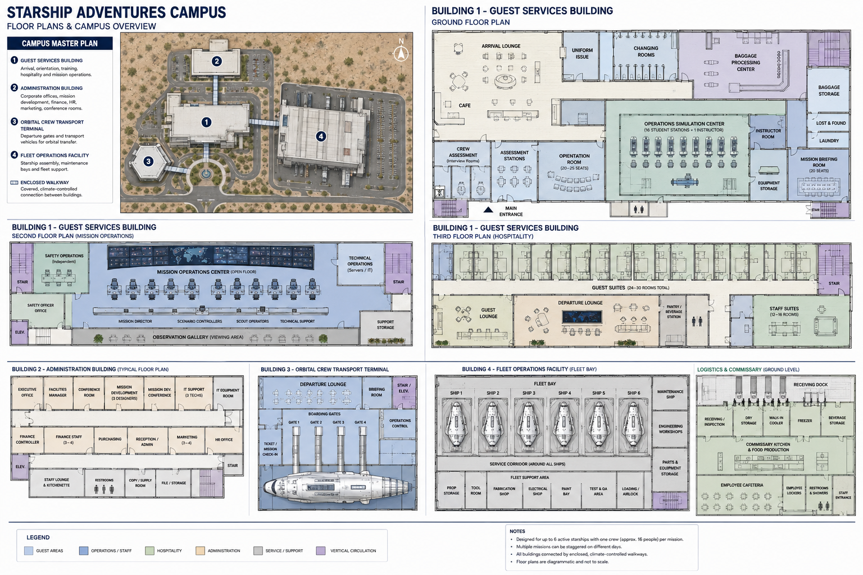
This document describes the physical campus and operational organization that deliver the Starship Adventures experience: the facilities, infrastructure, logistics, support systems, and organizational framework required to operate multiple starships simultaneously while maintaining immersion, safety, and service standards.
Unlike the Guest Crew Experience, which describes the mission as guests perceive it, this document describes the unseen organization that produces it. The campus is the arrival point, training center, command headquarters, hospitality center, and staff support facility for all operating vessels, and it sustains the illusion that each Scout Class vessel is operating far from Earth while the real work of safety, simulation, hospitality, and maintenance proceeds out of view.
The document considers the campus and its operational areas, including the Guest Arrival Center, Crew Training Center, Hospitality Center, Orbital Transport Terminal, Mission Operations Center, Starship Assembly Facility, Mission Development Center, Business Administration Center, and Staff Support Center; the organizational structure and Mission Control roles, including the Mission Director, Mission Coordinator, and Safety Officer; the hidden safety systems and emergency override authority that take precedence over the simulation; and the simulation technologies, from operational consoles to visual projection, audio, and atmospheric effects, that sustain immersion throughout a mission.
The purpose of this document is to define the facility and operational requirements that underlie the campus construction estimates and staffing model in the Financial Model and Capital Analysis, and to serve as the foundation for site planning, architectural and engineering development, and operational design. It describes design intent rather than construction documentation; detailed architectural, engineering, and operating specifications would be developed during project planning.
Starship Adventures Campus
This document explains how the Starship Adventures experience is operationally delivered. It describes the facilities, infrastructure, logistics, support systems, and organizational framework required to simultaneously operate multiple starships while maintaining the immersion, scalability, and service standards necessary to support long-term growth.
The Starship Adventures Campus is far more than a ride operator’s booth. It is the unseen organization that creates the illusion that the Scout Class vessel is actually operating hundreds or thousands of light years from Earth.
The term “campus” supports future expansion. Today there are six Scout Class ships, ten years later there may be 12 Scout Class ships, two Explorer Class ships, Academy programs, a convention center, museum, retail complex, and corporate event center. “Starship Adventures Campus” sounds like a destination.
The Starship Adventures Campus is a central facility supporting all operating Scout Class starships. It serves as the arrival point, training center, command headquarters, hospitality center, and staff support facility.
The complex is divided into the following operational areas.
| Guest Arrival Center | Guest arrive and check in. |
| Crew Training Center | The Crew Training Center is where guests transition from visitors into crew members. |
| Hospitality Center | The Hospitality Center serves as the transitional environment between Earth and the starship. |
| Orbital Transport Terminal | The Orbital Transport Terminal (OTT) is the place where the transformation to space begins to feel real. It is effectively the last piece of Earth a guest sees before stepping into the Starship Adventures universe. |
| Mission Operations Center | The Mission Control Operations Center (MOC) is the nerve center of the entire Starship Adventures program. |
| Starship Assembly Facility | Inside are the six active starships, one maintenance vessel, service corridors, and technical support. |
| Mission Development Center | Mission Development is responsible for not only creating missions but also analyzing past crew missions evaluating what worked and what didn’t. |
| Administration Center | The Business Administration Center houses the corporate functions that support the Starship Adventures enterprise. |
| Staff Support Center | Because Starship Adventures operates continuously, a significant number of employees may reside on-site. |
The Mission Control Complex should feel less like a theme park and more like a functioning space agency headquarters. To a guest, the campus experience unfolds in stages:
- Arrival at Mission Control
- Crew Indoctrination
- Team Formation
- Overnight Stay in the Hospitality Center
- Transport to the Starship
- Mission Launch
By the time guests step through the airlock of the Scout Class vessel, they should already think of themselves not as customers, but as a newly assigned crew preparing to depart on an interstellar mission.
Mission Operations Center
The Mission Control Operations Center (MCOC) is the nerve center of the entire Starship Adventures program.
Its purpose is to monitor, support, and control all active starship missions:
- Mission Director
- Ship Controllers
- SCOUT Operations
- Safety Operations
- Simulation Control
- Infrastructure Support Management
- Fleet Monitoring
- Communications
The best Mission Control Operations is one the guests are aware of but do not interact directly with. In fact, guests should believe they are operating independently. The crew should believe that if they fail a mission, nobody is coming to save them. Guests should feel Isolated, responsible, independent, and uncertain.
Actually, Mission Control Operations quietly ensures the experience remains safe, believable, and continuously engaging while remaining almost completely invisible throughout the voyage. If the crew becomes stuck Mission Control Operations can provide additional sensor data, hints through the ships AI, SCOUT, or new discoveries without making the assistance obvious. Responsibilities include:
| Mission Management | Mission Controllers oversee: Mission objectives Scenario progression Crew performance Mission timing Event scheduling Each active starship has a dedicated Mission Team. |
| Simulation Control | Operators manage: Star systems Planetary encounters Sensor contacts Communications traffic Mission events Alien encounters This team effectively controls the simulated galaxy. |
| Ship Systems Monitoring | Engineers monitor: Reactor systems Life support Artificial gravity Communications Navigation Environmental systems The Operations Center can inject: Equipment malfunctions Emergency scenarios System degradation Unexpected events to support mission objectives. |
| Safety Oversight | A separate safety staff monitors: Fire systems Medical alerts Structural systems Emergency exits Guest welfare Safety operations remain completely independent of the simulation staff. |
Mission Control Operations is located in a large operations theater. This room serves as the command center for all active vessels. A central display wall shows the overall status of all vessels including:
- Ship status displays
- Mission timelines
- Crew location displays
- Environmental monitoring
- Mission event tracking
Each ship has Mission Coordinator Console which can control the simulation through the ship’s systems.
- Crew locations
- Door status
- Environmental systems
- Power systems
- Camera feeds
Crew Training Center
The Crew Training Center is where guests transition from visitors into crew members.
This facility is designed to create the psychological shift from modern Earth to life aboard a starship.
Guests arrive at Mission Control Complex by entering the Crew Indoctrination Center where they check in. Once all registered mission guests arrive, they begin their day long orientation.
| Activities | Expected Results | |
| Phase 1 Orientation | Guests receive: UniformsAccess credentialsAssignment packages Personal belongings not needed aboard ship are secured. | There are no roles yet. Everyone id equal. |
| Phase 2 Crew Assessment | Guests complete: Personality assessmentLeadership assessmentTechnical assessmentMission interest assessment | The ship’s AI assess guest’s aptitudes for assignments. AI Assessment Results Leadership Aptitude: High Technical Aptitude: High Scientific Aptitude: Moderate Diplomatic Aptitude: Low Recommended Departments: Command Engineering |
| Phase 3 Interactive Orientation | Learn ship layoutLearn terminologyLearn proceduresLearn chain of commandLearn emergency protocols | People begin learning how others think. Natural leaders emerge.Natural engineers emerge.Natural diplomats emerge. |
| Phase 4 Operational Training | The crew is trained on using SCOUT, the ships AI and user interface appropriate to their designated assignment. For Example: Navigation ModulePlot courseAvoid hazardsInterpret sensor dataEngineering ModuleBring reactor onlineAllocate powerRespond to simulated faultScience ModuleAnalyze anomalyInterpret scansDeploy probesCommunications ModuleDecode transmissionHandle diplomatic trafficManage distress callMedical ModuleDiagnosing casualtyTreat simulated injuryCoordinate evacuation | Guests may change roles depending on their Team Exercise experience. Guests select final assignments. The Captain and XO may also be selected here. |
| Phase 5 Crew Integration Exercises | Build trustEstablish communication habitsValidate command structureDevelop department coordinationIdentify weaknesses before mission departure | See Crew Integration Exercises for example. |
The ship begins to develop its own social structure before departure.
Business Administration Center
The Business Administration Center houses the corporate functions that support the Starship Adventures enterprise. Guests rarely see this area.
| Executive Officies | Responsible for Strategic planning Corporate governance Expansion initiatives Investor relations |
| Finance Department | Responsible for Accounting Payroll Budgeting Procurement Revenue analysis |
| Marketing and Sales | Develops: Advertising campaigns Convention presence Guest acquisition Travel partnerships Membership programs |
| Mission Design Division | Develops: New missions Story content Alien civilizations Scientific anomalies Mission databases |
| Engineering and Technical Development | Responsible for: Simulation technology SCOUT development Facility upgrades Hardware improvements This group maintains the technological infrastructure supporting the experience. |
Hospitality Center
The Hospitality Center serves as the transitional environment between Earth and the starship. Guests typically spend one night here after orientation and before boarding. This allows missions to begin the moment guests step aboard.
| Crew Accommodations | Guest RoomsCrew loungeDining facilities Recreation roomDeparture lounge The design begins introducing the aesthetic of future space travel. |
| Crew and Staff Mess Hall | Guests dine together before departure. This serves several purposes: Team bonding Informal role discussions Mission planning Social interaction Many crews begin organizing themselves during these meals. Staff have their meals here, but they remain in character so as not to destroy the illusion that this is a Starship Adventures campus. |
| Hospitality Commissary | The Hospitality Center should contain a commercial production kitchen. This becomes the food service hub for the entire fleet. For six active ships: Breakfast production Lunch production Dinner production Desserts Snacks Beverages All prepared centrally. This is exactly how: Luxury resorts Cruise ships Airlines Private aviation caterers often operate. |
| Departure Lounge | A controlled environment where guests await transport to the starship. Large displays may show: Mission briefings Star charts Fleet traffic Weather conditions on destination worlds This begins building anticipation. |
| Transport Terminal | Guests board a simulated transport vehicle or shuttle. Once they depart the Hospitality Center: the mission officially begins. The transition is designed so guests feel they have left Earth behind. |
Staff Housing and Support Center
Because Starship Adventures operates continuously, a significant number of employees may reside on-site. The Staff Housing and Support Center provides accommodations and support services.
| Residential Quarters | Housing is provided for: Mission Controllers Hospitality Staff Chefs Stewards Maintenance Personnel Security Staff Medical Staff Housing ranges from dormitory-style accommodations to family apartments for long-term personnel. |
| Employee Dining Facilities | Separate dining facilities support: Day shift Evening shift Overnight shift Operations continue around the clock. |
| Recreation Facilities | May include: Fitness center Lounge spaces Outdoor areas Entertainment rooms These facilities support staff retention and morale. |
| Training Academy | All employees receive ongoing training in: Guest interaction Emergency procedures Mission operations Technical systems Role-playing techniques Mission Controllers in particular undergo extensive certification. |
| Maintenance Support Facilities | Workshops support: Electronics repair Mechanical maintenance Fabrication Prop construction System testing These facilities keep the fleet operational between missions. |
Starship Assembly Facility
The Starship Assembly Facility is the physical infrastructure that makes six simultaneous starship missions possible. Internally, however, it is essentially a giant starship simulator hall. The structure houses six complete Scout Class starship deck assemblies.
Each ship is:
- Independent
- Fully enclosed
- Sound isolated
- Motion capable
- Mission configurable
The guest/crews should never know the other ships exist or the real purpose of this facility. Thus, the name
Internal Organization
There are five zones.
Zone 1 Mission Control Complex
Located at one end it contains the Operations Center, Indoctrination Center, Hospitality Center, and Administration. Guests enter here.
Zone 2 Transit System
This zone connects Mission Control to the ships. Guests never see the warehouse. Instead, they experience the Spaceport, Shuttle terminal, Transport tunnel, and Orbital transfer vehicle
Zone 3 Fleet Bay
This is the heart of the facility. It contains the six starships.
Zone 4 Technical Support Corridor
This zone provides hidden access routes surrounding all vessels. It is used by Maintenance, Safety, and Mission Control personnel.
Zone 5 Engineering and Fabrication
The area is located opposite Mission Control. It contains Workshops, Equipment storage, Simulator maintenance equipment, and Prop fabrication.
This structure has a dual disguise. Part of the structure resembles a tank farm for vehicle transport fuel. In fact, a portion of it is real — the campus genuinely needs water, fire-suppression, and thermal storage, so several tanks are functional, which makes the façade hold up to scrutiny. The decoy hangar doors on the opposite face are sealed panels with an outlined apron, implying a fleet of crew transports based inside. Together they explain everything an outside observer sees: a huge windowless industrial building, vehicle activity at one end, fuel infrastructure at the other.
The starship deck stacks comprising the six ships are arranged three per side with a central service corridor. Each ship faces another ship with the central service corridor in between. Separation between ships should be 15 to 20 meters. This is critical because it allows access to every vessel with adequate ship separation to avoid sound, vibration and light bleed between missions.
The actual starship simulator[1] consists of:
- Habitable Hull
- Six stacked decks.
- Motion Platform
Docking sleeve at every berth.
Each ship’s nose faces the central corridor, and each berth has a permanent sleeve station on the corridor wall. The OTV travels the guideway to its assigned station and stops; the Orbital Transfer Sleeve then extends the short distance from the OTV’s flank to the ship’s forward airlock while the vehicle remains attached — exactly the Stage 4–5 sequence in Volume 3. Because all six stations sit on one spine, a single OTV (or several) can serve any ship without the sleeve geometry changing, and crews from different missions never cross paths: the sleeve-to-airlock transfer is fully enclosed, so guests step from spaceplane to starship without ever seeing the fleet bay.
Starship Adventures Campus
Organizational Structure
| Position | Description | Responsibilities |
| Mission Director | Equivalent to a space agency Flight Director. | Overall mission execution for all active Starships.Scenario progressionSafety authorityMajor event authorizationEmergency intervention Only one Mission Director is on duty for each active ship. |
| Mission Coordinator | Implements Mission scenarios (scripts) and ensures the mission remains challenging but solvable. Tracks: Script progressionCrew decisionsCharacter interactionsTeam performance Controls script content | Can inject: Equipment failuresPower fluctuationsCooling problemsCommunications outagesHints Facilitates external queues: External visual environmentStarfield movementPlanetary approachesSensor contactsTraffic encountersEnvironmental effects |
| Safety Officer | Responsible for actual guest and employee safety. | Monitors: Medical emergenciesFacility alarmsFire systemsEvacuation systemsStructural systems Unlike the simulation staff, the Safety Officer can immediately override the experience. Authority exceeds everyone else. |
| Mission Control Facilities Manager | Managers overall Mission Control facility, supporting infrastructure, and functional starship mechanisms. | Facility Maintenance Starship Maintenance Utility Management Janitorial Services |
Mission Development
Mission Development is responsible for not only creating missions but also analyzing past crew missions evaluating what worked and what didn’t. This data becomes invaluable for refining future missions and enhancing the crews’ experience. Fulfilling this responsibility requires the team to create a persistent universe concept. This is especially important for repeated bookings.
Mission Themes
Mission Themes Are Extremely Important. Most guests won’t simply book a “5-Day Starship Mission”. Instead, they will book an Exploration Cruise charting unknown worlds, making scientific discoveries, conducting mapping surveys looking for anomalies, or making first contact.
| Example Thems | Scenarios |
| Exploration Cruse | Unknown worlds Scientific discoveries Mapping missions Anomalies |
| Rescue Operations | Distress calls Medical emergencies Disaster response |
| First Contact | Diplomacy Alien cultures Translation puzzles Negotiation |
| Frontier Survey | Resource assessment Colony support Dangerous environments |
| Espionage and Intrigue | Hidden agendas Secret objectives Corporate rivals Political factions |
| Horror / Mystery | Missing crews Ancient ruins Strange signals Unknown entities |
| Mission Operations | Mission planning Fleet coordination Threat response |
Examples
Mission A discovers an ancient alien relay.
Three weeks later:
Mission B receives data originating from that relay.
Two months later:
Mission C investigates the civilization that built it.
Previous guests begin hearing about events created by other crews.
This creates the feeling that the galaxy exists independently of any one mission.
Mission Development responsibilities:
- Mission categories
- Mission storylines (scripts)
- Mission objectives
- Scientific investigations
- Engineering challenges
- Exploration scenarios
- Diplomatic encounters
- Emergency situations
To create a persistent universe, they maintain:
- Star systems
- Planetary systems
- Alien species
- Governments
- Corporations
- Historical events
- Navigation databases
They create mission events such as random encounters, unexpected emergencies, distress calls, navigation hazards, and crew dilemmas. This prevents missions from feeling scripted. The mission library should support:
- Hundreds of mission templates
- Thousands of event combinations
- Randomized encounters
- Dynamic crew-specific challenges
- Persistent galactic events
The goal is to convince investors that mission content scales indefinitely.
Dynamic Mission Event Library
Mission Control should maintain a library of injects.
Examples
- Technical Events
- Reactor fluctuation
- Sensor failure
- Gravity instability
- Life support degradation
- Communications outage
- Scientific Events
- Unknown signal
- Gravitational anomaly
- Strange radiation
- Derelict spacecraft
- Human Events
- Crew conflict
- Political crisis
- Refugee request
- Distress call
- Ethical Events
- Often the most memorable. These create discussion long after the mission ends.
For example:
- Save colony or save ship?
- Rescue survivors or complete mission?
- Share technology or protect civilization?
Mission Difficulty Architecture
Missions are categorized by type and by difficulty. Guests can choose the level of difficulty for their mission. The level of ship automation can be adjusted to reflect their choice.
| Audience | Difficulty | |
| Cadet Missions | First-time guests | Highly guided Frequent SCOUT assistance Simplified puzzles Officer Missions |
| Officer Missions | Returning guests | Reduced guidance More complex decision making Multiple objectives Command Missions |
| Command Missions | Experienced crews | Minimal assistance Severe consequences Resource shortages Branching outcomes Legendary Missions |
| Legendary Missions | Invitation-only Multi-day campaigns Persistent consequences Very difficult This provides a progression path that encourages repeat bookings. |
Safety Systems
Emergency Override Authority
Real-world safety is hidden but critical. This includes:
- surveillance monitoring
- emergency exits
- staff override controls
- concealed staff access corridors
- Guests should never perceive these systems.
Mission Control possesses absolute authority over:
- Reactor simulation
- Gravity simulation
- Lighting
- Sound systems
- Environmental systems
- Scenario progression
In a real emergency the simulation freezes and SCOUT announces: “Mission Pause. Please stand by.” Then safety personnel intervene appropriately. Mission resumes when it is safe.
Hidden Staff Access Points
Behind-the-Scenes staff access is a critical element to maintain the total immersion concept. Staff must be able to move unseen in or around the ship to allow staff to:
• trigger scenarios
• repair systems
• monitor safety
• reset equipment
• emergency egress
Hidden access points would connect to most public spaces such as the bridge control area, the galley, near lifts, engineering, airlocks, and cargo spaces.
Simulation Technologies
Operational Consoles
Functional bridge stations include:
- Helm
- Engineering
- Science
- Communications
- Drone Operations
- Systems monitoring
- Command Operations
Simulation Infrastructure
The experience is supported by:
- Networked mission systems
- AI assisted interactions
- Real-time mission management
- Crew tracking systems
- Simulated ship diagnostics
- Environmental automation
- Dynamic lighting/audio systems
- Interactive touchscreen consoles
Guests interact with systems that appear operational and interconnected rather than decorative. Crew actions influence:
- Ship status
- Mission progression
- Environmental events
- Narrative outcomes
- Crew success or failure
This layer drives physical immersion effects. Systems include:
- Lighting controllers
- Sound systems
- Vibration actuators
- Door motors
- Atmospheric effects
- Projection displays
- Red alert triggers:
- flashing lights
- bridge alarms
- deck vibration
- Engine failure triggers:
- lighting flicker
- machinery noise
- reactor alarms
The most realistic approach should include:
| Layer 1 – Always Active | Airflow Temperature control Ambient sounds |
| Layer 2 – Operational Effects | Warp Docking Reactor operations Sensor sweeps |
| Layer 3 – Mission Events | Equipment failures Anomalies Environmental hazards |
Artificial Gravity Simulation/Motion Platform
Because humans expect gravity, the ship uses psychological illusions rather than actual microgravity. To reinforce the idea that the starship is using artificial gravity simulating microgravity effects such as using subtle floor vibrations and carefully placed lighting to create that floating sensation could be implemented. Optical illusions could be created to give the sense of microgravity. Strategically placed mirrors and angled surfaces to make people appear to float with clever lighting tricks to distort perspective and enhance the artificial gravity effect. Methods include:
- Subtle Floor Motion
- Low-frequency vibration simulates:
- rotating habitat ring
- machinery operation
- artificial gravity stabilization
- Lighting Direction Tricks
- Lighting shifts slightly upward to create:
- floating visual cues
- disorientation effects
- Mirror & Perspective Tricks
- Angled corridors and mirrored panels produce visual illusions of vertical drift.
- Prop Interactions
- Loose floating objects simulated with:
- magnetic suspension
- transparent wires
- airflow jets
- Crew members may also use zero-G experiment props.
To accomplish this effect, the deck assembly is placed on a motion platform in the Mission Control Operations warehouse. The diagram below illustrates how the concept might be implemented.
Motion System
Each ship sits on an independent motion platform. Not roller-coaster levels of movement. Think: 2-3° pitch and 2-3° roll capable of providing subtle vibration and occasional impulses; just enough to simulate acceleration, docking, warp transitions, and turbulence.
Internal Lighting System
Spaceflight often exposes crew members to unusual sleep, wake and work schedules, including abnormal ‘day-length’ and abrupt ‘slam-shifts’ with late night work hours, which can lead to circadian pacemaker misalignment. Untreated circadian misalignment results in sleep and wake occurring at the incorrect circadian phase which, in turn, reduces sleep quality and quantity, impairs alertness, reaction time, and cognition, and increases risk of fatigue-related accidents.
Light is a powerful countermeasure for both circadian misalignment and sleepiness. The effects of light are safe, non-pharmacological and available from ambient lighting. Research has shown that monochromatic and narrow-bandwidth short-wavelength blue light are potent in suppressing nocturnal melatonin, phase-shifting the circadian pacemaker, and enhancing alertness and performance. Further, white-appearing light can be enriched in the blue portion of the spectrum to increase its potency to suppress melatonin, increase alertness, improve work performance and enhance sleep in healthy subjects. The enrichment of white-appearing light in the blue portion of the spectrum has strong potential as a safe, non-pharmacological countermeasure to reduce the risk of circadian misalignment and performance deficits during spaceflight.
A Dynamic Lighting Schedule is based on the spectral and intensity sensitivity of the human circadian photoreceptor system. The Dynamic Lighting Schedule determines when each of three pre-determined light settings should be used to optimize lighting for different operational needs including:
- facilitate circadian adaptation.
- enhance sleep.
- improve alertness and performance, while maintaining high visual acuity and color discernment for operational tasks.
Each setting has a unique intensity and spectrum to optimize its efficacy. The ship is configured with four default settings:
- General Illumination setting – 4500 K white light, 210 cd.
- Phase Shift/Alertness setting – 6500 K (blue-enriched) white light, 420 cd.
- Pre-Sleep setting – 2700 K (blue-depleted) white light, 90 cd or ideally lower.
Crew members have additional control based on tasks or preferences including color change, hue, and brightness.
Sound Systems
The sound system is one of the most important immersion systems on the ship, and one that is often underestimated. Most simulators treat audio as background entertainment. For Starship Adventures, the sound system should function as a ship subsystem just like propulsion, life support, or lighting. The crew should rarely notice the sound system itself. Instead, they should unconsciously believe they are hearing the ship.
Design Philosophy
A real ship is never silent. Even modern naval vessels have:
- Ventilation sounds
- Machinery hum
- Structural creaks
- Pumps
- Fans
- Door actuators
- Electronic equipment
The Scout Class should feel alive in the same way. The soundscape should constantly tell the crew: “The ship is operating.” The sound system should be designed as a distributed ship-wide audio network rather than a conventional public-address system. Components would include:
- Local compartment speakers
- Directional speakers
- Subwoofers integrated into deck structures
- Vibration transducers in floors and bulkheads
- SCOUT voice network
- Environmental sound processors
- Mission Control audio injection capability
The ultimate goal is that guests stop hearing speakers and begin hearing the ship itself. When that happens, a reactor casualty, warp jump, docking operation, or alien encounter becomes dramatically more believable because the vessel sounds like a living machine rather than a building in a warehouse.
Ambient Ship Sounds
These sounds are always present yet almost imperceptible. For example: the hum of the reactor and other low -frequency background tones. These sounds vary slightly with power demand. They may be quiet during standby, louder during maneuvering, and different during warp. Engineering hears it most strongly.
The ventilation system emits soft airflow sounds present throughout corridors. This creates a sense that life support is functioning. Structural sounds make occasional clicks and pops as expansion noises. Distant mechanical equipment noise creates the illusion of a very large vessel.
Location-Based Audio
Every compartment should sound different. The bridge is mostly quiet and controlled and should feel calm, but it has computer sounds and alert tones. Engineering is much louder with power converters, reactor hum, and coolant pumps. Here the crew should feel like they are standing near powerful machinery. The Explorations Operations Center has sensor equipment and analysis systems. Airlocks have pressure equalization sounds, door actuators, and warning tones.
Directional Audio
This is where the system becomes impressive. Imagine hearing: CLANG from somewhere above. Everyone looks up or, “Engineering to Bridge.” coming from the overhead intercom. The sound should originate from the correct direction, not just from ceiling speakers. The use of distributed speakers should be used throughout the ship.
Ship Status Audio
The ship itself communicates through sound. Normal Operations are quiet, comforting, and consistent. Elevated Readiness introduces subtle changes such as the reactor tone increases; there is additional console activity. The crew senses something is happening. Red Alert changes the ship entirely with alarm tones, emergency announcements, and warning chimes. Endless sirens should be avoided as they become annoying after a multi-day mission.
Motion Audio
This is critical for immersion. The ship should sound like it is moving. During sublight acceleration the crew hears the engines build up. There is structural vibration and power transfer sounds combined with motion platform effects.
Warp Entry begins with low frequency build up with rising harmonic tones, a brief vibration, then sudden quiet. The crew immediately knows “We are at warp.” Warp Cruise has a very subtle background resonance and is different from normal operation. It is almost musical. Warp Exit is the reverse sequence; it creates anticipation.
External Environment
This is extremely important. Even though sound doesn’t travel through space, the crew expects feedback. The ship computer would convert sensor information into audible cues. For example, a passing asteroid generates a low rumble. A spatial anomaly generates a strange resonance. A radiation storm creates electrical crackling sounds. And a nearby vessel creates a sensor ping signature with different ships producing different signatures.
SCOUT Integration
SCOUT should use the same audio infrastructure. Not just speakers on the bridge. Instead, SCOUT exists everywhere. A crew member can say: “SCOUT, what’s our fuel status?” and SCOUT responds from the nearest speaker like the ship itself is speaking.
Hidden Narrative Audio
Mission Control can use sound to guide crews. For example, a faint “ping” generated from a science console causes a crew member to investigate and a new discovery begins. Or an unusual vibration appears and Engineering becomes concerned.
Crew Quarters
This is an area where many simulations fail. Cabins should be quiet but not silent. Guests should hear distant ventilation, faint machinery, and occasional hull sounds; just enough to feel they are sleeping aboard a starship, but not enough to disturb sleep.
The lighting system and sound system should work together to create a believable day/night cycle.
Atmospheric Effects
For Starship Adventures, atmospheric effects should be used very sparingly. Most attractions overuse fog machines, smoke, and wind effects. Guests quickly realize they are in a theme park. A real starship should normally feel clean, temperature controlled, stable, and comfortable. Atmospheric effects can create the feeling that the ship is a real environment responding to events rather than a static building.
Atmospheric effects become powerful when they are rare and tied to events. The most effective atmospheric effect is often not something dramatic like fog or smoke. The crew should rarely notice any single effect. The crew should think: “Something unusual is happening.” not “The special effects just turned on.” because that means they have started treating the ship as a real place.
Airflow
The typical starship environmental atmosphere uses subtle effects operating continuously.
Airflow is critical, the ship should never feel stagnant. Life support should create very gentle air movement. Different areas could have different airflow characteristics. The Bridge’s airflow is almost imperceptible; it is quiet and controlled. Engineering has a slightly stronger airflow suggesting equipment cooling. The cargo areas have more noticeable circulation. Airlocks have distinct airflow changes when cycling. The crew never consciously notices, but they would notice if it disappeared.
Temperature Zoning
Different compartments should feel slightly different. The Bridge is a constant 70-72°F while the Exploration Operations Center maintains a temperature of 68-70°F. Engineering’s temperature averages at around 72-75°F. Cargo Areas are cooler at 65-68°F. This creates subconscious realism.
Humidity Control
Life support could subtly vary humidity. Engineering slightly drier. Again, guests probably won’t consciously identify it, but it helps make spaces feel unique.
Ship Operations Effects
These occur when the ship is actively doing something. For example, during Reactor Startup Engineering experiences a slight temperature increase, Increased airflow, and new machinery sounds. The ship feels alive.
During Warp initiation, one of the most memorable moments, lights dim slightly, air handling changes tone, floor vibration begins, low frequency audio increases and the temperature drops several degrees. Then the Warp transition when there is nothing dramatic. Just enough to create anticipation.
High Power Operations, such as using shields, sensor sweeps, or docking operations results in increased ventilation, subtle vibration, audible equipment activation.
Emergency Effects
These are where atmospheric systems become extremely valuable. To simulate an electrical fire there is no actual smoke. Instead, a faint localized burning electronics odor can be smelled. This causes the crew to begin searching. At the same time, Mission Control watches. When it is found the crew feels clever for finding it.
A coolant leak in the Engineering compartment results in temperature drop. Mist appears near equipment and condensation develops. This provides visual and tactile feedback.
Perhaps more spectacular is an atmospheric leak. In the affected compartment airflow increases, pressure alarms activate, and the ambient sound changes. No actual pressure change needed. The illusion is enough.
A Reactor malfunction in Engineering causes the temperature to rise. Ventilation increases and equipment sounds intensify. The compartment feels stressed.
Scent Systems
This is extremely powerful but must be used carefully. Perhaps Engineering smells of machine oil and warm electronics. The Exploration Operations Center smells like a sterile environment. The Cargo Hold has an industrial smell.
Care should be taken to avoid overly strong scents, artificial perfume-like odors or anything that screams: “Theme park.” Subtlety is everything.
Airflow Simulation
Spacecraft interiors should not be windy. However, Airlock Operations should result in a brief air movement during atmospheric entry. There should also be a mild vibration. Generally, avoid large fans.
Atmospheric Storytelling
This is where Mission Control can shine. Imagine the crew enters engineering. One person says, “Does it feel hotter in here?” Another notices and asks, “Why is that pump louder?” A third sees condensation, yet there was no announcement of a failure. The crew discovered it. This is vastly more immersive than: “Warning. Reactor fault detected.”
Visual Project Systems
Visual Projection System is arguably the single most important technology in Starship Adventures. Don’t think of the Visual Projection System as “screens.” Think of it as the ship’s sensor and information network. Every display should answer one question: “What information would the crew of a real interstellar vessel need right now?”
Designing around that principle, the displays stop feeling like themed decorations and start feeling like genuine ship systems. That distinction is critical because guests aren’t looking for entertainment screens they want to believe they are serving aboard a functioning starship.
Guests can forgive a lot of things. They will forgive not having actual artificial gravity. They will forgive not having real warp drive. They will forgive a warehouse hidden outside the hull. What they will not forgive is looking out a “window” and seeing something that feels fake.
The Visual Projection System is what convinces the brain: “I am aboard a starship.”
Design Philosophy
The ship should never have traditional windows. Instead, it should have Sensor Display Surfaces. This is exactly how a real spacecraft would likely operate. The reason is eliminating windows ensures better radiation protection, strengthens hull integrity, and structural strength.
Every external view is actually a display generated from sensors. This also gives Mission Control complete control over what the crew sees.
Categories of Visual Systems
There should be at least five major systems.
| Bridge Main Viewscreen | The most important display onboard. This is the equivalent of a windshield, tactical display, and navigation display combined. Crew should feel like they are looking through a window. | Large enough to dominate the forward bridge: 12 meters wide by 3 meters high Displays: star fieldsplanetsshipsasteroidsanomalies. See Bridge View Requirements below. |
| Department Displays | Every department should have dedicated displays. | Science Lab Displays: Spectral analysis,Planetary mapping,Probe feeds and Telescope imagery. These displays become mission tools. They are not decoration. Engineering Displays: reactor statuspower flowthermal mapssystem health Engineering should feel operational. Communications Displays: Incoming messageslanguage analysissignal tracking |
| Airlock Projection System | One of the most overlooked opportunities. | Imagine: The airlock door opens. The crew sees: OuterspaceA docking bayAlien spacecraftSpace station corridor Projected beyond the door. The brain immediately accepts: “We arrived.” |
| Environmental Projection System | Used throughout the ship. | Display wall showing: current star systemnearby planetsmission progressCorridors Occasional: status displaysnavigation mapsfleet updatesDining AreaMission briefings.News reports. |
| Holotable System | One of the most valuable mission tools. Imagine a large table in: Briefing roomExploration Operations CenterCommonsEngineering The crew gathers around it naturally. | Displays: Planet3D terrain model.Star SystemOrbital mechanics.Ship DamageCompartment status.Drone SurveillanceContact positions. |
A note about Warp Effects
Warp should not look like science-fiction streaking stars. That has become cliché. Instead, there should be subtle space distortions with stars displaying a color shift where the background geometry bends. The effect should feel physically believable.
Projection Technologies
Ordinary projectors are inadequate. Instead, Primary Displays should be LED video wall panels, Micro LED panels, or High-brightness displays. These are reliable and look incredible. Secondary Displays should be transparent OLED or rear projection using holographic film where appropriate.
Simulating External Views
Mission Control can create several levels of realism.
| Level 1-Static starfield | Least expensive. |
| Level 2-Dynamic celestial navigation | This is very important: Stars move correctly.Planets move correctly. |
| Level 3-Persistent Galaxy | The galaxy exists independently. Every ship sees: same starssame planetssame events This is where the system becomes impressive. |
Bridge View Requirements
The bridge display should always provide:
- Mission Objectives
- Alert and Warning Layer
- Navigation Layer
- Course
- Velocity
- Destination
- Sensor Layer
- Contacts
- Threats/Hazards
- Anomalies
Planetary Approaches
The planet appears as a distant dot, growing larger in just several hours. These may become guests’ favorite moments as the ship performs orbital insertion and the planet’s surface detail becomes visible. The crew feels like they traveled there.
Information Technology Infrastructure
The IT infrastructure should not be treated as ordinary office technology. It is part of the attraction itself. For Starship Adventures, IT is the hidden nervous system of the campus:
- it runs the starships
- protects the guests
- controls the illusion
- supports the business
- records the mission
- feeds SCOUT
- enables repeat-guest career progression
The architecture should be designed for a secure industrial simulation campus, not like a hotel with Wi-Fi. The campus should be designed like a hybrid of data center + hotel/resort + industrial control facility + live production studio + secure simulation platform.
The key principle: separate networks by function. Guest Wi-Fi, mission simulation, building automation, fire/life-safety, payment systems, administration, and starship control should not share the same flat network.
Network Cabling
Network cabling should be an industry standard based on modern commercial-building practice. TIA’s 568 commercial cabling family is intended for planning and installing structured cabling in commercial buildings.
The Backbone Cabling should use a fiber optic backbone between:
- Guest Services Building
- Administration Building
- Orbital Transport Terminal
- Fleet Operations Facility
- Logistics / Commissary
- Data center / MDF
There should be dual redundant fiber path, with single-mode fiber for long campus runs and multimode fiber inside buildings where appropriate. Diverse physical routes should be considered so one trench cut does not disable the campus.
Horizontal Cabling should be based on Cat 6A to workstations, access points, cameras, phones, AV panels, badge readers. Fiber to high-bandwidth simulator rooms, LED walls, server rooms, control centers, and starship simulators. Each building should have:
- MDF or main telecom room
- IDF rooms per floor
- Cable trays
- Patch panels
- UPS-backed switches
- Environmental monitoring
Network Segmentation
Separate VLANs / network zones should be considered for:
- Mission Simulation Network
- Starship systems
- SCOUT
- mission events
- simulator controls
- visual/audio systems
- Safety Network
- emergency overrides
- evacuation systems
- safety monitoring
- door release interfaces
- Building Automation Network
- HVAC
- lighting
- power monitoring
- water systems
- kitchen equipment monitoring
- Security Network
- cameras
- access control
- intrusion detection
- staff-only corridors
- Administrative Network
- finance
- HR
- purchasing
- marketing
- file systems
- Guest Services Network
- check-in
- reservations
- point-of-sale
- guest profiles
- Public Guest Wi-Fi
- internet only
- no internal access
- Staff Wi-Fi
- controlled access
- MFA required
- Development / Test Network
- mission development
- software testing
- staging environment
- Vendor / Contractor Network
- temporary
- monitored
- isolated
This should be designed around a zero-trust security model, where no device is trusted simply because it is inside the campus network. NIST’s Zero Trust Architecture guidance defines this as moving away from implicit trust based on network location.
Wireless
Use enterprise Wi-Fi, likely Wi-Fi 6E or Wi-Fi 7 depending on deployment timing and device support. Wi-Fi 7 is based on IEEE 802.11be, but final vendor selection should be made during design.
Wireless networks:
- Guest Wi-Fi
- Staff Wi-Fi
- Operations handhelds
- Maintenance tablets
- Warehouse scanners
- Hospitality POS
- Secure emergency staff network
Relying on Wi-Fi for mission-critical simulator control should be avoided. Use wired Ethernet wherever timing, reliability, or safety matters.
Internet Connectivity
A minimum of two diverse fiber internet providers should be used with one microwave or 5G backup with services on separate circuits for guest internet and business operations.
DDoS (Distributed Denial of Service) protection should be employed as well as static IP blocks and SD-WAN or edge routing redundancy. The campus should be able to continue missions even if public internet fails. Internet loss should not stop active ship simulations, SCOUT local functions, life-safety systems, access control, or internal communications.
Routers, Firewalls, and Security
Enterprise-grade devices including redundant core routers, redundant next-generation firewalls, and internal segmentation firewalls provide a solid hardware base. Mission systems should not be directly reachable from the internet.
IDS (Intrusion Detection System) and IPS (Intrusion Prevention System) are core cybersecurity technologies designed to monitor, detect, and respond to malicious activities on a network. Both analyze network traffic for suspicious patterns or known threats, but they handle the response very differently. The Main Difference: Detection vs. Prevention. Modern cybersecurity frameworks rely on deploying both technologies together or integrating them into a unified system.
Other technologies such as Zero Trust Network Access (ZTNA), Multifactor Authentication for all staff systems, privileged access management, endpoint detection and response and centralized logging, and security information event/ management (SIEM) should be considered.
Servers and Data Center
The campus needs an on-site data center because latency and independence matter. Primary On-Site Systems:
- virtualization cluster
- storage cluster
- backup servers
- SCOUT application servers
- mission simulation servers
- video/render servers
- audio control servers
- building management servers
- access control servers
- camera recording servers
- reservation/check-in servers
- file/document management
- development servers
- monitoring servers
Operating Systems might be a mix of Linux for simulation servers, SCOUT back end, databases, and web services. Windows Server for Active Directory, supporting file services, finance apps, desktop management might be the best fit for the back office.
Real-time or embedded Linux for simulator control systems where needed.
Hardened appliance OS for firewalls, routers, storage, cameras, and access control.
Applications
Business Applications
- reservation system
- CRM
- payment processing
- finance/accounting
- purchasing/inventory
- HR/payroll
- document management
- guest profile system
- food preference/dietary system
Mission Applications
- SCOUT AI platform
- mission control dashboard
- crew tracking
- ship systems simulation
- damage/failure simulation
- dynamic event library
- mission timeline engine
- debrief/report generator
- persistent universe database
- video playback/render system
- audio routing system
- lighting/effects control
- motion platform control interface
Facilities Applications
- building management system
- energy monitoring
- HVAC control
- kitchen production scheduling
- work order system
- asset management
- preventive maintenance
- CMMS system
Software Development Environment
- Mission Development needs a real software pipeline. Include:
- Git repository
- issue tracking
- CI/CD pipelines
- artifact repository
- test environment
- staging environment
- production environment
- simulation sandbox
- automated backup of source code
Compilers / Toolchains
Likely stack:
- C++ for performance-critical simulation modules
- C# / .NET for Windows-based control applications
- Python for automation, AI tooling, data pipelines
- JavaScript / TypeScript for dashboards and control interfaces
- SQL for databases
- Unity or Unreal Engine for visual simulation environments
- container platform such as Docker / Kubernetes for scalable services
UPS and Power Protection
Power failure should degrade the experience gracefully, not crash the mission. Every critical IT room needs UPS. UPS Coverage:
- core network
- firewalls
- servers
- storage
- Mission Operations Center
- SCOUT systems
- access control
- camera systems
- emergency communications
- simulator shutdown controllers
Use:
- rack UPS for small closets
- large, centralized UPS for data center
- generator backup for extended outages
- dual power supplies on critical servers and switches
Fire and Life Safety Systems
Fire alarm should be designed as a separate life-safety system, not just another IT application. NFPA is the main U.S. standards body for fire and life-safety codes. The fire system may interface with IT, but it should not depend on normal IT to function. Include:
- addressable fire alarm panels
- smoke detection
- heat detection
- sprinkler monitoring
- kitchen hood suppression
- emergency voice evacuation
- strobes/sirens
- fire doors
- stair pressurization where required
- emergency lighting
- fire command center
- direct monitoring by local fire service or central station
Cameras, Access Control, and Tracking
Use:
- IP cameras throughout public, staff, service, and ship areas
- no cameras in private cabins or bathrooms
- RFID/NFC badges
- staff access levels
- guest access credentials
- emergency override access
- concealed service corridor access logging
- real-time location tracking for safety
Crew tracking is especially important inside starships for:
- emergency response
- scenario control
- evacuation
- mission analytics
Data Architecture
- Major databases:
- guest profile database
- crew history / career database
- mission outcome database
- persistent universe database
- ship system telemetry database
- video/audio event logs
- maintenance database
- inventory database
- food and beverage manifest database
Backups should be scheduled for local snapshots, off-site replication, immutable backups, and disaster recovery environment.
Mission-Critical Design Rule
The campus should have three operating modes:
| Normal Mode | Everything online. |
| Degraded Mode | Internet or partial systems unavailable, but missions continue. |
| Safe Mode | Simulation pauses, safety systems remain active, guests are managed by staff. |
SCOUT should support this gracefully: “Mission pause initiated. Please stand by for operational instructions.”
SCOUT
What is SCOUT?
SCOUT stands for:
Scout Class Operating Umbrella Technology
To the crew, SCOUT is the ship’s Artificial Intelligence. SCOUT is responsible for assisting the crew in operating the vessel while remaining subordinate to crew authority. Unlike many science-fiction themes SCOUT does not command the ship. The crew commands the ship. SCOUT advises.
Core Philosophy
SCOUT should behave like a highly competent bridge officer. Not a servant. Not a chatbot. Not a comedian. Not a character constantly seeking attention. Instead, SCOUT is professional, calm, reliable, and helpful. If the Captain asks, “SCOUT, recommend a course around the anomaly.” SCOUT would respond, “Three routes are available. Route Alpha minimizes travel time. Route Bravo minimizes radiation exposure. Route Charlie preserves fuel reserves. Recommend Route Bravo.” The decision remains with the captain.
Role 1: Ship Operations Interface
This is SCOUT’s most obvious role. Every ship system is accessed through SCOUT. Navigation can ask, “SCOUT, plot a course to Outpost Sigma.” And SCOUT responds, “Course calculated. Estimated transit time twelve hours.”
The First Officer says, “SCOUT, perform long-range scan.” SCOUT displays contacts, planets, anomalies, and hazards.
Engineering request “SCOUT, show reactor status.” SCOUT displays power output, fuel reserves, cooling status, and system health.
Communications instructs “SCOUT, open channel.” SCOUT manages routing, encryption, and translation.
Role 2: Crew Instructor
Particularly important for first-time guests is to have a full-time personal instructor. Most guests will have no idea how to operate a starship. SCOUT teaches them. SCOUT becomes the onboard instructor.
A guest asks, “How do I launch a probe?” and SCOUT responds with “Probe deployment requires navigation authorization and science package selection. Would you like guided assistance?”
Role 3: Mission Advisor
SCOUT provides recommendations not solutions.
“Sensor analysis suggests option B carries the lowest risk.” The crew still decides.
Role 4: Knowledge Repository
SCOUT is effectively the ship’s encyclopedia with an exhaustive content that includes Starship Adventures universe. It contains:
- Star systems
- Species
- Historical records
- Technical manuals
- Crew records
- Mission logs
For example, if the Captain asks, “SCOUT, what do we know about the Vesper Colonies?” SCOUT provides the available information.
Role 5: Mission Control Interface
This is invisible to the crew. When Mission Control needs to communicate SCOUT becomes the delivery mechanism. For example, if the crew asks, “SCOUT, update stellar cartography.” SCOUT queries Mission Control. Mission Control generates new data. SCOUT presents it and the crew never knows.
This is one of the most important functions in the entire experience.
Role 6: Dynamic Storytelling Engine
SCOUT can subtly guide crews. Instead of, “You missed a clue.”, SCOUT says, “Long-range sensors continue detecting unusual emissions from Sector Seven.” The crew investigates. They feel they discovered it themselves.
Role 7: Emergency Management
In emergencies SCOUT becomes critical. In the event of a simulated fire SCOUT announces, “Fire detected in Engineering Section Two.” Or “Hull Breach. Atmospheric loss detected. Bulkheads sealed.”
During a simulated Medical Emergency, SCOUT announces, “Medical assistance requested in Crew Quarters. Mission Pause.” If a real-world emergency occurs SCOUT announces, “Attention crew. Mission pause has been initiated. Please stand by for instructions.” This allows immersion to end gracefully.
Role 8: Crew Performance Analysis
SCOUT should be tracking everything. Not to score guests but to build a mission record.
Performance parameters include:
- Decisions made
- Resources consumed
- Scientific discoveries
- Crew coordination
- Crisis response
At mission conclusion for the Mission Debrief, SCOUT produces the official mission report.
Role 9: Personality Engine
This is where many projects make mistakes. SCOUT should absolutely have a personality. But it should be subtle. Possible personality traits:
- Calm
- Analytical
- Respectful
- Patient
- Occasionally dry humor – Very occasionally.
Role 10: The Persistent Character
This is where SCOUT becomes extremely valuable. Every ship may have a different captain, and every mission has a different crew, but SCOUT remains. A returning guest might say, “SCOUT, we’ve worked together before.” SCOUT replies, “Confirmed. You previously served aboard Scout Vessel Horizon as Chief Science Officer during the Helios Survey Mission.” Now the guest feels recognized.
Mission Completion
At mission end, SCOUT participates in the mission debrief. Imagine the lights dim slightly. The crew is assembled. SCOUT announces:
“Mission Complete. Primary objectives achieved.”
“One hundred thirty-two stellar objects cataloged.”
“Three survivors recovered.”
“One previously unknown archaeological site identified.”
“Crew performance exceeded mission expectations.”
Then:
“It has been my honor to serve with you.”
That single line will have more emotional impact than almost any plaque or souvenir because, for the entire mission, SCOUT was the one constant companion.
In many ways, SCOUT is not merely a ship system. SCOUT is the embodiment of the ship itself. When guests remember their voyage years later, they should remember not only where they went and what they discovered, but also the AI that helped them get there.
Conclusion
Starship Adventures is not a simulator attraction. It is an operational entertainment platform designed to place guests into the role of a functioning starship crew operating within a persistent science-fiction universe.
The Starship Adventures Campus provides the infrastructure necessary to transform this vision into a scalable business. Through the integration of purpose-built starship simulators, mission control operations, hospitality services, advanced information technology, dynamic mission development, and the SCOUT artificial intelligence platform, the campus creates an environment capable of supporting multiple simultaneous missions while maintaining a level of immersion rarely achieved in location-based entertainment.
Unlike traditional attractions that rely on fixed experiences, Starship Adventures is designed around replayability. Missions evolve, crews make meaningful decisions, and events occurring during one voyage can influence future missions. This persistent-universe approach allows content to expand indefinitely while encouraging repeat visitation and long-term customer engagement.
The campus architecture is equally scalable. The initial six-ship configuration establishes a foundation that can support future fleet expansion, academy programs, corporate events, conventions, educational experiences, and additional classes of starships. As the Starship Adventures universe grows, the campus becomes not merely an attraction but a destination.
Taken together, the Business Plan, Guest Experience Model, Campus Design, and Scout Class Starship Specification demonstrate that Starship Adventures is both technically achievable and commercially scalable. The result is a new category of immersive entertainment: a place where guests do not simply observe a story but live it as crew members aboard a starship undertaking missions among the stars.
Scout Class Design Specification presents evidence demonstrating the believability of the Starship Adventures universe. This document is extremely important. It is likely many investors will initially assume this is Just another simulator. The Scout Class Design Specification conveys the realism of the spacecraft ecosystem. This distinction is critical to the Starship Adventures branding.
[1] See Simulation Technologies Section