
System Overview
This specification defines S.C.O.U.T. (Scout Class Operating Umbrella Technology), the integrated operating system of the Scout Class starship. S.C.O.U.T. is not a single device but the umbrella under which the vessel’s crew interfaces, supervisory intelligence, computing core, networks, and operational applications are unified into one coherent system. It is the means by which the crew perceives, commands, and collaborates with the ship.
S.C.O.U.T. is composed of the following principal subsystems, each specified in this document:
- Crew interfaces. The means by which crew interact with the system: the touchscreen consoles (Section 2), the public audio interface, and the personal audio link (earbuds). The relationship between these is defined in the Crew Interaction Tiers overview, Section 2.
- Supervisory intelligence (the AI). The distributed ship intelligence that monitors, advises, coordinates, and operates alongside the crew across every station (Section 8).
- Computing core. The quantum-primary computing architecture with a classical emergency core that executes navigation, warp-field, AI inference, and ship-management workloads (Section 9).
- Networks. The hardened, domain-isolated command-and-control network connecting all of the above (Section 10).
- Applications. The operational software the crew uses to run the ship, from propulsion control to life support to the astronomical suite (Section 10).
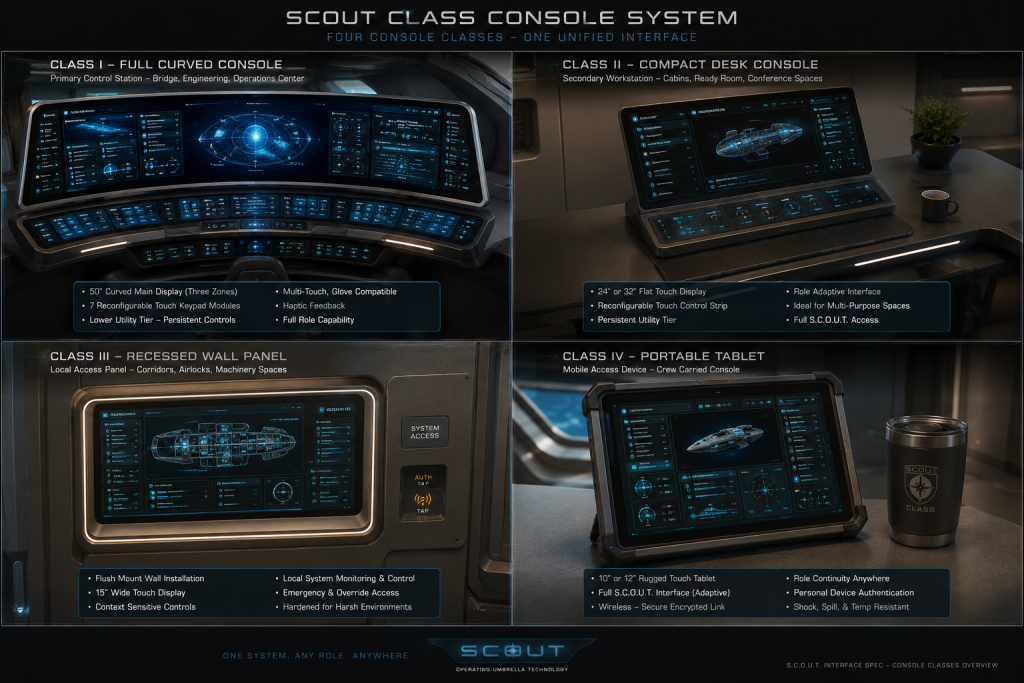
Anything the crew can do by touch at a console, they can do by voice through the AI, and the AI continuously supports the operator through monitoring, recommendation, and delegated autonomy. Every console aboard the vessel is physically identical; all role differentiation is implemented in software.
Vessel Mandate and Absence of Weapons
The Scout Class is an unarmed exploration and scientific survey vessel. Per the vessel specification, it carries no conventional tactical or weapons systems; its design emphasizes state-of-the-art propulsion, advanced and experimental sensor suites, and scientific instrumentation. Accordingly, S.C.O.U.T. defines no weapons-management role. The situational-awareness and self-protection functions an explorer genuinely requires — contact detection, hazard tracking, threat assessment, evasion, and non-weapon countermeasures — are consolidated in the Defensive & Situational Awareness (DSA) role defined in Section 4.
The architecture remains forward-compatible with an optional tactical module for armed refits or non-exploratory Scout Class variants, but no such module is fitted on standard exploration vessels. See Appendix B.
Design Philosophy
Scout Class vessels operate with minimal crews on extended independent deployments. S.C.O.U.T. therefore follows four governing principles:
- Role-agnostic hardware. Any crew member can operate any station in any role. Hardware never constrains crew assignment; a casualty at one station never eliminates a capability.
- Configuration follows the operator. Crew profiles, saved layouts, key assignments, and the personal audio link travel with the individual’s credential, not with any physical console.
- Always within reach. Through the personal audio link, every crew member maintains continuous contact with S.C.O.U.T. anywhere aboard the vessel, not only when seated at an authenticated console.
- Graceful degradation. Loss of any single console, interface, network domain, or computing core is absorbed by reconfiguring or failing over to the remaining resources. Multiple independent command paths exist for every critical function.
Crew Interfaces and Interaction Tiers
The crew interacts with S.C.O.U.T. through three complementary interfaces. They are tiered by reach and authority: the personal audio link is always present, the public audio interface is available in any compartment, and the console provides full authenticated command authority. A crew member moves fluidly between them through a single working session.
Crew Interaction Tiers
| Tier | Interface | Availability | Authority |
| Personal | Personal audio link (earbuds) Section 6 | Always, anywhere aboard, while worn | Continuous private dialogue, advisories, coaching; voice commands within the wearer’s credential |
| Public | Public audio interface (compartment microphones and speakers) | Any compartment with audio coverage | Voice interaction and alerts; sensitive actions still require authentication |
| Station | Touchscreen console — Sections 3–5 | At any console, once authenticated | Full command authority for the active role, including guarded actions |
The three tiers share one identity and one conversation. A crew member wearing an earbud is already in contact with S.C.O.U.T.; when they sit at a console and authenticate, the same conversation continues with the console’s full authority added. When they walk away, the dialogue follows them back to the earbud. Authentication governs authority, not contact: the personal link is always connected, but commands that change ship state are validated against the wearer’s credential exactly as they are at a console.

Figure 1. Generic (unconfigured) S.C.O.U.T. console — three configurable display zones over the seven-module touchscreen keypad tier. The console is the Station tier of the crew interaction model; all role configurations are software variations on this common hardware.

Figure 9. S.C.O.U.T. console — component overview. All consoles are physically identical; role differentiation is software-defined via Mode Select.
Console Hardware Specification
Main Display Assembly
| Parameter | Specification |
| Form factor | Single continuous curved panel, three logical display zones |
| Dimensions (active area) | 50 in (127 cm) wide × 14 in (35.6 cm) tall |
| Aspect ratio | Approximately 25:7 (3.57:1) ultrawide |
| Curvature | Concave horizontal curve, 1000R nominal, edges angled toward seated operator |
| Resolution | 10,240 × 2,880 native (approx. 205 PPI); zone-addressable |
| Touch system | Projected-capacitive multi-touch, 40 simultaneous contact points, glove-compatible mode |
| Surface | Optically bonded, anti-glare, EMP-hardened transparent laminate |
| Logical zones | Left Configurable Display / Primary Workspace (center) / Right Configurable Display, with full-width Quick Info Strip |
| Redundancy | Each zone driven by an independent display controller; any controller can drive all three zones at reduced refresh |
Keypad Tier
| Parameter | Specification |
| Form factor | Full-width touchscreen surface matching the 50 in main display width, inclined 20° from horizontal |
| Dimensions (active area) | 50 in (127 cm) wide × 6 in (15.2 cm) tall nominal |
| Module slots | Seven reconfigurable module regions: Display Controls, View & Layout, Data Filters, Navigation/Cursor Control, Data & Interaction, Shortcut Keys, System Interaction |
| Haptics | Per-key localized haptic actuators; programmable intensity 0–100%; escalating-profile support for guarded actions |
| Key rendering | Touch targets resize and reposition per role configuration; minimum target 18 mm; guarded actions rendered with confirmation borders |
Lower Utility Tier
A secondary full-width touch surface below the keypad tier carries the six persistent utility modules: Mode Select, Display Assignment, Alerts & Notifications, Communications, Power & Priority, and Haptic Feedback. These modules remain present in every role configuration, although individual roles may mirror, elevate, or partially lock their functions as defined in Section 5.
Common Console Provisions
- Brightness, contrast, UI scale, theme (3 presets), and screen layout (single / split / quad) adjustable per operator via Display Controls.
- Numeric shortcut block (1–9, 0, CLEAR, ENTER) plus four programmable USER keys (A–D) in every configuration.
- All consoles network over redundant fiber rings with the ship AI core; any console may assume any station’s function.
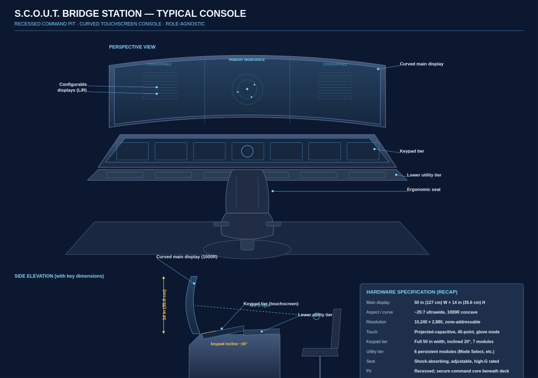
Figure 10. S.C.O.U.T. bridge station — typical console. Perspective view and dimensioned side elevation of a single crew station matching the hardware specification.
Console Software Architecture
Layout Engine
The S.C.O.U.T. layout engine treats every display zone as a widget container. The widget library (Star Map, Flight Data, Sensor Feed, Comm Status, Target List, System Status, and mission-loadable extensions) can populate any zone in any combination. The Layout & Widget Manager on the left display provides drag-and-drop arrangement; EDIT LAYOUT, SAVE LAYOUT, and LOAD LAYOUT functions on the keypad tier manage the operator’s personal layout library.
The LOCK LAYOUT control on the Primary Workspace freezes the current arrangement against accidental touch input. Certain role configurations engage layout lock automatically under defined conditions (see role sections).
Mode Select and Role Profiles
The Mode Select module switches the entire console — all three display zones, the Quick Info Strip, every keypad module, and the alert profile — between role configurations in a single action. A role configuration is a named bundle of:
- Display zone assignments and default widget layouts,
- Keypad module mappings and key target geometry,
- Shortcut key (1–9, 0) and USER key (A–D) bindings,
- Alert level defaults and lockout rules,
- Control authority grants (which ship systems the console may command),
- Haptic and audio cue profiles.
Role switching completes in under one second. The outgoing role’s state is checkpointed so a crew member returning to a role resumes exactly where they left off.
Credentials and Control Authority
Control authority is granted by the intersection of the operator’s credential and the active role. Selecting a role exposes that role’s controls, which then validate the operator’s authorization before any action takes effect. Guarded actions (all-stop, coordinated evasion, load shed, reactor SCRAM, section vent, distress transmission) use two-stage confirmation with role-specific haptic profiles.
AI Interface Coupling
Every function available through the console surface is also addressable through the S.C.O.U.T. AI interface, and the two pathways remain continuously synchronized. The AI is treated as a co-operator at every station rather than a separate utility. Its full capabilities — voice command, autonomous monitoring, layout and action recommendation, role-specific delegation, and reduced-crew operations — are specified in Section 9.
Multi-Console Linking
The Display Assignment module assigns content to the left/center/right zones and links consoles to mirror or extend one another. Linked consoles behave as one logical surface: a DSA operator can push the situational picture to the Pilot’s right zone; the Science station can extend its analysis workspace across an adjacent unoccupied console. Link state is indicated on the Quick Info Strip of every participating console.
Standard Role Configurations
This section specifies the six standard role configurations. Each subsection defines the default display zone allocation, the keypad tier remapping, shortcut and USER key bindings, and operational notes particular to the role. All defaults may be customized per operator within the limits of the role’s control-authority profile; defaults restore via LOAD LAYOUT → ROLE DEFAULT.
A consolidated cross-role comparison is provided in Appendix A.
PLT – Pilot Configuration
The Pilot configuration prioritizes immediate spatial awareness, vessel attitude, and maneuvering authority. All flight-critical data is concentrated in the operator’s central field of view, with confirmation-gated controls relocated outboard to prevent accidental activation during high-G or evasive maneuvering.

Figure 3. Pilot configuration — helm plot centered, flight data and forward sensor feed flanking, fly-by-wire vernier pad.
Display Zone Allocation
| Display Zone | Default Configuration |
| Left Configurable Display | Flight Data widget stack: attitude indicator, velocity vector, thrust profile, fuel/reaction-mass state, inertial damper status, and structural load monitor. |
| Primary Workspace (Center) | Helm plot: forward navigational sphere with projected flight path, conn orders queue, collision-avoidance envelope, and docking/landing guidance overlay when within terminal approach parameters. |
| Right Configurable Display | Sensor Feed (forward view) with situational overlay showing contacts within the maneuvering envelope; switchable to aft/ventral camera clusters for docking operations. |
| Quick Info Strip | Speed, heading, altitude/orbital radius, ETA to active waypoint, and inertial damper load percentage. |
Keypad Tier Configuration
| Keypad Module | Role-Specific Function |
| Navigation / Cursor Control | Remapped as a fly-by-wire vernier pad: directional pad provides translation pulses (RCS); ZOOM IN/OUT become throttle increment/decrement; ORBIT and FOLLOW engage autopilot sub-modes. |
| Data & Interaction | SELECT TARGET locks navigational reference; TRACK/LOCK slaves the helm plot to a contact; ADD WAYPOINT inserts an immediate course node pending Navigator confirmation. |
| Data Filters | Filters contacts by collision risk, transponder class, and time-to-closest-approach. |
| View & Layout | Presets: Cruise, Maneuvering, Docking, Atmospheric Entry, Emergency. |
| System Interaction | POWER MGMT shortcut requests thrust priority from Engineering; DIAGNOSTICS limited to propulsion and attitude-control subsystems. |
Shortcut and User Key Assignments
| Key | Assigned Function |
| 1–3 | Autopilot modes: Hold Attitude, Hold Course, Station-Keep |
| 4–6 | Thrust presets: 25% / 50% / Full Military |
| 7–9 | RCS modes: Fine, Standard, Coarse |
| USER A | All-stop (double-press confirmation) |
| USER B | Evasive maneuver execute (vector proposed by DSA console) |
| USER C | Docking mode toggle |
| USER D | Hand off helm to AI voice interface (verbal confirmation required) |
Operational Notes
- Haptic Level defaults to 90% in Pilot mode; tactile confirmation substitutes for visual confirmation during maneuvers.
- Layout lock engages automatically when vessel acceleration exceeds 2G to prevent unintended widget rearrangement.
- The all-stop key (USER A) is rendered with a 30% larger touch target than standard keys in this mode.
NAV – Navigator Configuration
The Navigator configuration is optimized for course plotting, stellar cartography, and long-horizon route management. Where the Pilot view is reactive and short-range, the Navigator view is predictive and strategic, presenting the same data set at system and interstellar scale.
Figure 4. Navigator configuration — sector star map, course plot with burn timing, and ephemeris/survey data.
Display Zone Allocation
| Display Zone | Default Configuration |
| Left Configurable Display | Star Map widget at sector scale with plotted route, gravity-well boundaries, hazard corridors, and fuel-optimal transfer windows. |
| Primary Workspace (Center) | Primary plot: active course with waypoint chain (e.g., Waypoint Alpha), object-selected detail pane showing distance, bearing, and ETA; deviation-from-plan indicator; burn schedule timeline. |
| Right Configurable Display | Ephemeris and survey data: celestial body catalog, drift-correction log, and jump/transit solution validator. |
| Quick Info Strip | Current waypoint, cross-track error, next burn countdown, total route ETA, and navigational sensor confidence. |
Keypad Tier Configuration
| Keypad Module | Role-Specific Function |
| Navigation / Cursor Control | Standard chart-manipulation mapping: pan/zoom across the star map, ORBIT rotates the 3D plot, FOLLOW centers on the vessel’s projected position. |
| Data & Interaction | ADD WAYPOINT is the primary action and is elevated in size; OPEN DETAILS retrieves full ephemeris records; SHOW ON MAP cross-references catalog entries to the plot. |
| Data Filters | Time Filter scrubs the plot forward/backward to preview orbital mechanics; Tag Filter isolates charted vs. uncharted objects. |
| View & Layout | Presets: System Plot, Sector Chart, Transit Solution, Survey Overlay. |
| System Interaction | ROUTING module fully unlocked: course library, transfer calculators, and arrival-window planning. |
Shortcut and User Key Assignments
| Key | Assigned Function |
| 1–3 | Chart scales: Orbital / System / Sector |
| 4–6 | Solution types: Fuel-Optimal / Time-Optimal / Stealth Transit |
| 7–9 | Plot overlays: Hazards / Traffic / Survey Grid |
| USER A | Commit course to helm (requires Pilot acknowledgment) |
| USER B | Plot return-to-base solution |
| USER C | Mark current position (survey log entry) |
| USER D | Request AI course verification |
Operational Notes
- Course commits are dual-key: the Navigator’s USER A transmits the solution, and the Pilot console must acknowledge before the helm plot updates.
- The Time Filter scrub function is unique to NAV mode and renders predicted positions up to 72 hours ahead.
DSA – Defensive & Situationall Awareness Configuration
The Scout Class carries no offensive weapons. The DSA configuration provides the situational awareness an exploration vessel requires to keep itself safe: contact detection and identification, hazard and debris tracking, threat assessment, evasive-maneuver coordination with the helm, and non-weapon defensive countermeasures. Where an armed vessel would prosecute a contact, the Scout Class characterizes it and, if necessary, avoids it. Display logic is assessment-oriented: every contact is classified and assigned a hazard envelope, but the console offers no engagement controls.

Figure 5. Defensive & Situational Awareness configuration — contact list, situational sphere with hazard arc, and non-weapon defensive systems.
Display Zone Allocation
| Display Zone | Default Configuration |
| Left Configurable Display | Contact List widget: prioritized queue of tracked contacts and charted hazards with IFF/transponder status, classification, closest approach distance, and closure rate. |
| Primary Workspace (Center) | Situational sphere: 360° awareness plot centered on own ship showing contacts, charted hazard arcs (debris fields, radiation zones, gravitational anomalies), and the recommended evasive vector when a hazard envelope is breached. |
| Right Configurable Display | Sensor Feed for identification: passive visual feeds, emission analysis, and spectral signatures used to characterize unknown contacts without active illumination where stealth is preferred. |
| Quick Info Strip | Tracks held, nearest-contact range, closure rate, evasion-readiness state, and countermeasure (ECM) status. |
Keypad Tier Configuration
| Keypad Module | Role-Specific Function |
| Navigation / Cursor Control | Cursor slews the sensor reticle across the situational sphere; ZOOM controls sensor magnification on the designated contact; FOCUS commits passive sensors to identification of the selected track. |
| Data & Interaction | SELECT and TRACK/LOCK designate and maintain a fix on a contact; ID CONTACT runs the classification routine; BROADCAST shares the characterized contact picture to all linked consoles. |
| Data Filters | Filters by contact state (unknown/charted/friendly), hazard type, and closure rate. RESET FILTERS restores the full situational picture and is guarded against accidental press. |
| View & Layout | Presets: Situational Overview, Hazard Watch, Evasion, Damage Control Support. |
| Defensive Systems | Non-weapon countermeasures only: decoy deployment, electronic counter-measures (ECM), and sensor-dazzle for breaking a hostile track. No offensive controls are present in standard fit. |
Shortcut and User Key Assignments
| Key | Assigned Function |
| 1–3 | Sensor posture: Passive Wide / Active Scan / Silent (emissions-controlled) |
| 4–6 | Countermeasures: Decoys / ECM / Sensor Dazzle |
| 7–9 | Hazard response: Mark Hazard / Plot Avoidance / Alert Helm |
| USER A | Initiate coordinated evasive maneuver (handshakes with Pilot console) |
| USER B | Recall all active countermeasures |
| USER C | Cycle next contact in priority queue |
| USER D | Broadcast contact picture to all linked consoles |
Operational Notes
- The Scout Class mounts no offensive weapons; the DSA role provides assessment and avoidance, not engagement. The console exposes no firing controls, weapon groups, or master-arm function in standard configuration.
- Evasive maneuvers (USER A) are a coordinated two-console action: DSA recommends the vector and the Pilot console executes it, mirroring the Navigator’s course-commit handshake.
- Alert Level defaults to ALL with audible alerts ON; these settings cannot be reduced below WARN while an unknown contact or breached hazard envelope is being tracked.
- DSA mode automatically pushes its situational overlay to any console with Display Assignment linking enabled.
- Forward-compatibility note: the console architecture can accept an optional tactical weapons-management module on armed Scout Class refits or non-exploratory variants. This module is not installed on standard exploration vessels and, when fitted, is gated behind command-level credentials and a hardware arming interlock. See Appendix B.
ENG – Engineering Configuration
The Engineering configuration replaces spatial plots with systems schematics. The console becomes a power-flow and damage-control workstation, presenting the vessel as an interconnected machine rather than an object in space.
Figure 6. Engineering configuration — full system status, interactive ship schematic, and trend telemetry.
Display Zone Allocation
| Display Zone | Default Configuration |
| Left Configurable Display | System Status widget expanded to full diagnostic depth: Propulsion, Power, Shields, Life Support, Sensors, Comms, and Navigation, each drillable to component level with color-coded thresholds. |
| Primary Workspace (Center) | Interactive ship schematic (the cutaway hull view): power distribution grid, coolant loops, atmosphere zones, and damage-control sections. Touch any compartment to isolate, reroute, or dispatch repair tasking. |
| Right Configurable Display | Trend telemetry: reactor output curves, thermal load history, consumables projection, and predictive failure analysis from the AI maintenance model. |
| Quick Info Strip | Reactor output %, available power margin, hull integrity, life support reserve hours, and active fault count. |
Keypad Tier Configuration
| Keypad Module | Role-Specific Function |
| Navigation / Cursor Control | Navigates the schematic: pan/zoom across decks, ORBIT rotates the 3D hull model, SELECT isolates a subsystem branch. |
| Data & Interaction | TRACK/LOCK pins a component’s live telemetry to the Quick Info Strip; ADD WAYPOINT repurposed as ADD WORK ORDER for the maintenance queue. |
| Data Filters | Filters schematic by subsystem (power/thermal/atmosphere/structural) and by fault severity. |
| View & Layout | Presets: Power Grid, Damage Control, Cruise Monitoring, Reactor Detail. |
| System Interaction | POWER MGMT and DIAGNOSTICS fully unlocked, including load-shed planning and component-level test routines. |
Shortcut and User Key Assignments
| Key | Assigned Function |
| 1–3 | Power priority profiles: Combat / Cruise / Silent Running |
| 4–6 | Subsystem isolation: Propulsion / Shields / Life Support |
| 7–9 | Damage control: Seal Section / Vent Section / Dispatch Team |
| USER A | Execute load shed (per the Power & Priority module plan) |
| USER B | Reactor SCRAM (two-stage with physical-pressure haptic confirmation) |
| USER C | Acknowledge/silence current fault alarm |
| USER D | Request AI diagnostic narration of active fault tree |
Operational Notes
- The Power & Priority module (LOW/NOM/HIGH and LOAD SHED) is mirrored into the keypad tier in ENG mode so that power decisions never require reaching to the lower tier during a casualty.
- Reactor SCRAM uses an escalating haptic profile: the key vibrates with increasing intensity through the press-and-hold to provide unambiguous tactile feedback that a protective action is being commanded.
- Section vent commands (key 8) are inhibited unless the target compartment registers zero life signs or a command override is entered.
COM – Communications Configuration
The Communications configuration manages all internal and external signal traffic: hailing, encryption, traffic logging, electronic message handling, and signals intelligence support. The Communications hardware module on the lower tier is elevated to a full-screen workspace.

Figure 7. Communications configuration — channel matrix, spectrum waterfall, and directory/protocol library.
Display Zone Allocation
| Display Zone | Default Configuration |
| Left Configurable Display | Comm Status widget: active channel matrix, signal strength per array, encryption state, and queued outbound traffic. |
| Primary Workspace (Center) | Traffic workspace: live transcription pane (AI-generated), hail composition, frequency spectrum waterfall, and contact communication history. |
| Right Configurable Display | Directory and protocol library: known stations, hailing protocols by polity, first-contact linguistic packages, and distress-signal monitoring board. |
| Quick Info Strip | Active channel, signal strength, encryption status, unread message count, and time since last contact with fleet/base. |
Keypad Tier Configuration
| Keypad Module | Role-Specific Function |
| Navigation / Cursor Control | Tunes across the spectrum waterfall: directional pad steps frequencies, ZOOM narrows/widens band view, FOCUS locks the demodulator to a signal. |
| Data & Interaction | SELECT TARGET designates a contact for hailing; TRACK/LOCK maintains a directional antenna fix on a moving contact; OPEN DETAILS pulls the contact’s full traffic history. |
| Data Filters | Filters traffic by channel, encryption class, origin, and time range; TAG FILTER isolates flagged or intercepted traffic. |
| View & Layout | Presets: Fleet Net, Hailing, Intercept, Distress Watch. |
| System Interaction | ROUTING repurposed for signal routing: antenna assignment, relay scheduling, and bandwidth allocation across arrays. |
Shortcut and User Key Assignments
| Key | Assigned Function |
| 1–3 | Channel presets: Fleet Command / Local Traffic / Emergency Guard |
| 4–6 | Encryption modes: Clear / Standard / Command Cipher |
| 7–9 | Transmission modes: Voice / Data Burst / Tight-Beam Laser |
| USER A | Transmit distress signal (two-stage confirmation) |
| USER B | Open shipwide intercom (all-call) |
| USER C | Toggle AI live translation on active channel |
| USER D | Begin/end traffic recording and logging |
Operational Notes
- The lower-tier Communications module (channel, volume, squelch, PTT, mute) remains active and mirrors the keypad state, providing redundant physical-style sliders for fine audio control.
- Emergency Guard channels are monitored continuously regardless of mode; distress traffic generates a CRIT alert on every console shipwide.
SCI – Science Console
The Science configuration converts the console into a survey and analysis workstation, the core of the Scout Class mission. Sensor allocation, sample analysis, anomaly investigation, and survey cataloging take precedence over ship-handling data.

Figure 8. Science configuration — sensor allocation, analysis workspace with anomaly match, and survey catalog.
Display Zone Allocation
| Display Zone | Default Configuration |
| Left Configurable Display | Sensor Feed manager: allocation matrix for the sensor suite (EM, gravimetric, spectrographic, biosign), each with task queue and integration-time settings. |
| Primary Workspace (Center) | Analysis workspace: active scan visualization, spectrographic readouts, anomaly comparison against the survey database, and 3D reconstruction of scanned objects. |
| Right Configurable Display | Survey catalog: running log of charted objects, classification queue, sample manifest, and publication-ready survey report drafts generated by the AI. |
| Quick Info Strip | Active scan target, scan completion %, sensor allocation summary, anomaly flag count, and data storage remaining. |
Keypad Tier Configuration
| Keypad Module | Role-Specific Function |
| Navigation / Cursor Control | Steers sensor pointing rather than the cursor: directional pad slews the primary sensor cluster, ZOOM adjusts focal resolution, FOLLOW maintains a track on a moving phenomenon. |
| Data & Interaction | SELECT TARGET queues an object for deep scan; OPEN DETAILS retrieves catalog and database records; ADD WAYPOINT requests a survey waypoint via the Navigator’s queue. |
| Data Filters | Filters survey data by category (stellar/planetary/biological/artificial), tags, and time range — the deepest filter set of any role. |
| View & Layout | Presets: Wide Survey, Deep Scan, Anomaly Investigation, Sample Lab. |
| System Interaction | DIAGNOSTICS scoped to the sensor suite; CONFIGURATION includes sensor calibration routines. |
Shortcut and User Key Assignments
| Key | Assigned Function |
| 1–3 | Scan modes: Passive Wide / Active Focused / Deep Penetrating |
| 4–6 | Sensor priority: EM Spectrum / Gravimetric / Biosign |
| 7–9 | Catalog actions: Classify / Flag Anomaly / Append to Report |
| USER A | Commit deep-scan (high power draw; requests Engineering allocation) |
| USER B | Snapshot all active sensor feeds to the survey log |
| USER C | Compare current readings against database (AI match) |
| USER D | Push findings to Primary Workspace of all linked consoles |
Operational Notes
- Deep scans (USER A) automatically negotiate power allocation with the Engineering station; if no Engineering console is active, the request routes to the AI power manager.
- SCI mode has the largest persistent storage allocation and the only role-default with automatic background data compression.
Personal Audio Link
The personal audio link is each crew member’s continuous, private connection to S.C.O.U.T. It takes the form of a pair of compact in-ear devices — the crew earbuds — that keep the wearer in contact with the ship intelligence anywhere aboard, independent of any console. Where the console provides authenticated command authority at a station, and the public audio interface provides voice interaction in a compartment, the personal link provides presence: S.C.O.U.T. is always one word away, and the crew member is always reachable.
Figure 2. S.C.O.U.T. personal audio link (crew earbud) feature overview. The earbud is the Personal tier of the crew interaction model and keeps each crew member continuously connected to the ship intelligence.
Always-Connected Presence
While worn, an earbud maintains a constant encrypted, low-latency link to S.C.O.U.T. over the ship’s internal wireless mesh. The link is independent of console authentication: contact with S.C.O.U.T. is continuous from the moment the earbud is worn and recognized, whether or not the wearer is seated at a station. Command authority over ship systems is still governed by the wearer’s credential exactly as at a console — the link grants conversation and advisories to anyone wearing their own earbud, but state-changing commands are validated against authority. A crew member walking the corridors can ask S.C.O.U.T. a question, receive an alert, or be coached through a procedure without touching a surface.
Wear Patterns: One Ear or Two
The earbuds are designed to be worn singly as the normal case. Most of the time a crew member wears one earbud, leaving the other ear open to the compartment and to fellow crew. This is deliberate: it keeps the wearer present in the human conversation around them while remaining in contact with S.C.O.U.T. Both earbuds are worn when the crew member wants full immersion or privacy — concentrated work, a sensitive briefing, rest with active noise cancellation, or an environment too loud for a single bud to overcome.
6.3 Adaptive Noise Modes
Following the familiar model of high-quality consumer noise-cancelling earbuds, each earbud offers two primary acoustic modes, plus a focused third mode for paired wear:
| Mode | Behavior and Typical Use |
| Aware (default) | Ambient sound passes through naturally, so the wearer hears the compartment and fellow crew normally, with S.C.O.U.T.’s voice mixed in. This is the default and most-used mode, because crew are usually interacting with people and the ship at the same time. |
| Quiet | Full active noise cancellation suppresses ambient sound for focus, rest, or work in noisy machinery spaces. S.C.O.U.T. and priority alerts still come through; the AI can momentarily lift cancellation to admit a crewmate’s voice when addressed. |
| Private (paired) | Both earbuds worn, ambient minimized, attention given to a S.C.O.U.T.-only channel — used for sensitive dialogue, detailed coaching, or briefings the wearer does not wish to share with the compartment. |
Mode is changed by a touch gesture on the earbud, by voice, or automatically: S.C.O.U.T. may suggest Quiet mode when it detects the wearer is concentrating in a loud space or drop to Aware mode when a crewmate begins speaking to them. The wearer can always override.
Dual-Conversation Audio
The defining capability of the personal link is that a crew member can hold two conversations at once: one with a fellow crew member in the compartment, and one with S.C.O.U.T. in the ear. S.C.O.U.T. manages the overlap so the two threads do not collide:
- Voice ducking. When a human speaks to the wearer, S.C.O.U.T. lowers or pauses its own speech and resumes when the human thread allows, the way a considerate second speaker would.
- Whisper delivery. Routine tips and prompts are delivered quietly and briefly, sized to fit the gaps in the wearer’s other conversation rather than interrupting it.
- Beamforming capture. The earbud’s microphones isolate the wearer’s own voice, so they can speak to S.C.O.U.T. quietly without broadcasting to the compartment, and S.C.O.U.T. can tell whom the wearer is addressing.
- Thread separation. S.C.O.U.T. tracks which remarks are directed to it versus to the crewmate, so the wearer can move between the two without prefacing every sentence.
Mentor and Coaching Mode
The personal link is especially valuable for new or cross-trained crews. Because S.C.O.U.T. knows the wearer’s role, credential, and the live state of the ship, it can coach in real time through the earbud while the crew member works:
- A crew member acting as Navigator can receive quiet, just-in-time guidance — which solution to choose, what a deviation means, what to check before committing a course — without that guidance appearing on shared displays or being heard by others.
- S.C.O.U.T. can tell the wearer which control to interact with next, naming the keypad module or pointing to the console zone, effectively walking an inexperienced operator through a procedure step by step.
- Because coaching is private to the earbud, a crew member can learn a role under live conditions without broadcasting their inexperience to the rest of the crew.
This lets a small or green crew operate above its nominal experience level: S.C.O.U.T. supplies the procedural knowledge through the ear while the human supplies judgment and authority.
Authentication and Personalization
Each earbud binds to one crew member. In-ear biometric sensing confirms the wearer’s identity when the earbud is worn, and the link then carries that crew member’s credential and role profile. A borrowed or unrecognized earbud provides only general, non-privileged interaction until its wearer is identified. The personal case charges the pair, holds the binding, and re-pairs a replacement earbud to the same crew member.
Controls, Privacy, and Degraded Behavior
- Gesture controls. Tap, double-tap, hold, and swipe on the earbud surface map to mode toggle, push-to-talk to S.C.O.U.T., dismiss or acknowledge an alert, and volume. A status LED indicates link and mode state.
- Privacy. The personal channel is private to the wearer. S.C.O.U.T. will not relay a private earbud conversation to other crew or to the public address system without the wearer’s instruction, except where a shipwide emergency override applies.
- Public vs. private. Alerts that concern only the wearer come through the earbud; shipwide alerts sound on both the earbud and the public audio interface so they reach crew who are not wearing one.
- Degraded behavior. If the personal link drops, the public audio interface and consoles remain fully available, and S.C.O.U.T. notifies the wearer that the private channel is down. The earbud fails safe to a pass-through (Aware) acoustic state, so it never blocks a crew member’s hearing when unpowered.
Persistent Utility Modules (All Roles)
The lower utility tier remains available in every console configuration. Role-specific behavior is limited to the elevations and lockouts noted below.
Alerts & Notifications
Alert levels ALL / CRIT / WARN / INFO filter what the console surfaces; audible alerts toggle independently. Role lockouts: DSA mode cannot reduce alerts below WARN while an unknown contact or breached hazard envelope is tracked; ENG mode cannot silence CRIT-level reactor or life-support alarms; distress traffic generates a CRIT alert shipwide regardless of console settings.
Communications
Channel, volume, squelch, PTT, mute, and channel management are available at every station so any crew member can answer traffic. In COM mode the module is mirrored into the keypad tier and expanded into the full traffic workspace described in Section 5.
Power & Priority
Each console can request LOW / NOM / HIGH power priority for the systems its role commands. Requests arbitrate at the Engineering station, or at the AI power manager when no Engineering console is active. LOAD SHED executes the pre-planned shed sequence and is a guarded action outside ENG mode.
Haptic Feedback
Haptic intensity and audio cue level are operator preferences stored in the crew profile, with role-specific defaults (e.g., PLT 90% haptic). Guarded actions override the operator’s setting with mandatory escalating-intensity profiles so that protective actions are tactilely unambiguous in any role.
Display Assignment
Left / center / right assignment and console linking per Section 4.5. During heightened readiness the command station may force-push the DSA situational overlay to a designated zone of every linked console; the affected zone displays a LINKED — COMMAND banner.
Custom Role Composition
The CUSTOM ROLE function permits any credentialed crew member to compose a configuration from the full widget, module, and keybinding library. Custom roles are intended for mission-specific assignments (e.g., prize crew operations, planetary landing party coordination, medical triage) that do not map cleanly onto the six standard roles.
Composition Rules
- A custom role is assembled in the Layout Editor from the full widget library, keypad module library, and keybinding map.
- Control authority for a custom role is the union of authorities individually held by the operator’s credential; composing a role never grants authority the operator does not already hold.
- Guarded actions retain their two-stage confirmation and mandatory haptic profiles in all custom roles and cannot be rebound to single-press keys.
- Custom roles are stored in the operator’s crew profile and follow them to any console; they may also be published to the ship library for shared use, subject to command approval.
Representative Custom Roles
| Custom Role | Typical Composition |
| Landing Party Coordinator | Center: party telemetry and topographic map. Left: comm status for suit channels. Right: biosign sensor feed. USER keys: recall party, mark extraction point, open suit all-call, AI environmental watch. |
| Medical Triage | Center: crew vitals board. Left: compartment atmosphere status. Right: medical database. Keypad numerics remapped to casualty classification. |
| Prize / Boarding Operations | Hybrid DSA/ENG view of a docked vessel: its schematic on center, own-ship situational sphere on right, boarding team comms on left. |
| Watch Officer (reduced crew) | Condensed summary of all six standard roles’ Quick Info data with AI-monitored thresholds; any touched panel expands toward the relevant full role configuration. |
S.C.O.U.T. Supervisory Intelligence
The S.C.O.U.T. AI is the supervisory intelligence at the center of the system. It is integral to every interface — console, public audio, and personal link — rather than an accessory to any of them. It is designed around the operational reality of the Scout Class: a small crew, long independent deployments far from support, and a workload that routinely exceeds the number of hands available. The AI’s purpose is to let a reduced crew operate the vessel as though fully staffed, to keep every station useful even when unoccupied, and to keep every crew member supported wherever they are aboard.
Distributed Supervisory Architecture
The ship’s AI advises, coordinates, simulates, and optimizes. It uses a distributed supervisory architecture composed of separate flight, engineering, warp-field, damage-control, habitat, science, and emergency autonomy modules. It can predict failures, optimize power and thermal loads, coordinate maintenance, pilot drones, and automate routine operations, communicating with the crew through a natural-language interface. The supervisory intelligence is capable of:
- Mission planning and navigation support
- Crew assistance and a natural-language voice interface
- Situation summaries and anomaly detection
- Emergency recommendations
- Training simulations and live coaching
- Power and thermal optimization
Critical actions such as warp initiation, reactor mode changes, and main-engine burns require human authorization and are enforced by local controllers and hardware interlocks (Sections 11 and 12).
Voice Command and Natural Interaction
Every function reachable by touch is reachable by voice, whether spoken at a console, into the public audio interface, or privately through the personal link. The AI accepts natural conversational commands rather than rigid syntax, resolves them against the active role’s control authority, and confirms any guarded action verbally before execution exactly as the touch interface does. Voice and touch are interchangeable mid-task: an operator may begin plotting a course by voice and complete it by touch, or the reverse, with state preserved across both.
- Authority-aware. A voice command is validated against the speaker’s credential and the active role; the AI will not execute an action the operator could not perform by touch, regardless of which interface the command arrives through.
- Confirmation-preserving. Guarded actions (all-stop, load shed, reactor SCRAM, distress transmission, coordinated evasion) require the same two-stage confirmation by voice as by touch, including the verbal read-back of what is about to happen.
- Context-carrying. The AI tracks the active selection and recent actions, so follow-on commands such as “track that one” or “put it on the right screen” resolve correctly. Context follows the crew member across interfaces — a conversation begun on the personal link continues when they reach a console.
Autonomous Monitoring
The AI continuously monitors all ship systems and the full sensor picture in parallel, independent of which role any console currently displays. It surfaces what matters to the operator’s current role and escalates anything that crosses a threshold, regardless of role:
- System thresholds: reactor output, power margin, hull integrity, life-support reserves, and consumables, with predictive failure analysis that flags trends before they become faults.
- Situational thresholds: new or unknown contacts, breached hazard envelopes, and closure rates that warrant attention, raised to the DSA picture and to the command station.
- Communications watch: continuous monitoring of guard and distress frequencies, raising a CRIT alert shipwide on distress traffic even when no console is in COM mode.
Critical actions such as warp initiation, reactor mode changes, and main-engine burns require human authorization and are enforced by local controllers and hardware interlocks.
Recommendation and Layout Assistance
The AI proposes, the operator disposes. It may recommend a layout preset suited to the developing situation — surfacing the Engineering Damage Control preset when hull faults register, or the DSA Hazard Watch preset when a debris field is detected — but it never reconfigures an occupied console without acknowledgment. Recommendations appear as a dismissible prompt on the affected zone; a single touch or a word accepts.
Role-Specific Delegation
Each standard role assigns one USER key (and the equivalent voice command) to a role-relevant AI delegation function, allowing the operator to hand a bounded task to the AI while retaining oversight:
| Role | Delegated AI Function |
| PLT | Hand off helm to the AI for hold-attitude, hold-course, or station-keeping, with verbal confirmation and instant manual resumption. |
| NAV | Request AI verification of a plotted course solution against ephemeris, hazards, and fuel state before committing it to the helm. |
| DSA | Delegate coordinated evasion: the AI computes and proposes the evasive vector and, on acknowledgment, coordinates the handshake with the Pilot console. |
| ENG | Request AI narration of the active fault tree and recommended damage-control sequencing during a casualty. |
| COM | Toggle AI live translation and transcription on the active channel, including first-contact linguistic support. |
| SCI | Run AI comparison of current sensor readings against the survey database to classify objects and flag anomalies. |
Coaching Through the Personal Link
The supervisory intelligence delivers its most direct crew support through the personal audio link (Section 6). Because the AI knows each wearer’s role, credential, and the live ship state, it can coach privately and in real time: guiding a Navigator through a course solution, naming the next control an inexperienced operator should touch, or talking a crew member through an unfamiliar procedure — all in the wearer’s ear, without appearing on shared displays. This is the principal mechanism by which a small or green crew can operate above its nominal experience level.
Reduced-Crew and Unmanned-Station Operation
Because every station’s data and authority are available to the AI, an unoccupied console is not a lost capability. The AI maintains watch over the functions of any vacant station and routes alerts to a crewed console, to a crew member’s personal link, or directly to voice. A single watch officer can supervise the whole vessel through the Watch Officer custom role (Section 8.2), with the AI holding the routine workload of the unstaffed roles and escalating only what needs a human decision.
- Graceful escalation. Routine matters are handled or logged; threshold events are raised to the nearest crewed console or to a crew member’s earbud; anything requiring a guarded action is brought to a human, never executed autonomously.
- No autonomous guarded actions. The AI will recommend and prepare guarded actions but will not arm, shed, scram, transmit distress, or maneuver evasively without human confirmation, in any crewing state.
Degraded and Failure Modes
The interfaces back each other up. Loss of the AI leaves the touch console fully functional; loss of console surfaces leaves voice control available; loss of the personal link leaves the public audio interface and consoles available. If multiple paths are degraded, each console falls back to a minimal direct-control layout for its assigned role. The AI’s monitoring and recommendation functions fail safe: on uncertainty it raises an alert to the crew rather than acting, consistent with the no-autonomous-guarded-actions rule.
Operational Applications
S.C.O.U.T. hosts the operational software the crew uses to run the ship. Applications are presented through the console widgets, addressable by voice, and monitored by the supervisory intelligence. The following applications are provided in the standard exploration configuration:
| Application | Application | Application |
| Calibration System | Drone Control System | Damage Control |
| Cargo Management | Life Support Control | Docking |
| Ship Maintenance | Waste Management | Astronomical Suite |
| Diagnostic System | Propulsion Control | Communications |
| Food Inventory | Entertainment | Crew & Habitation |
| Sublight Propulsion | Training Software | Sensor & Science |
| Medical AI | Passenger Guidance | RCS Thruster Control |
| Door Access | Scheduling | Orbital Mechanics |
| Collision Avoidance | Internal Communications | Gravitational Stability |
| Enhancement & Analysis Systems | Reactor & Power Management | Warp Field Management System |
Each application maps to the role configurations and control-authority profiles defined earlier: for example, Propulsion Control, Sublight Propulsion, and RCS Thruster Control are exposed at the Pilot and Engineering stations within their respective authority limits, while the Astronomical Suite and Sensor & Science applications anchor the Science role. Safety-critical applications (Reactor & Power Management, Warp Field Management, Life Support Control, Door Access) are subject to the hardware interlocks specified in Section 11.
Computing Core
S.C.O.U.T. runs on a quantum-primary computing architecture backed by a hardened classical emergency core. The quantum cores carry the heavy computational load of a frontier exploration vessel — warp-field modeling, navigation and orbital-mechanics solutions, sensor and survey data processing, and AI inference — workloads whose scale and complexity suit quantum processing. The classical core exists to guarantee that survival-critical control never depends on the availability of the quantum tier.
Architecture Overview
The computing architecture is organized in three tiers that mirror the command structure of the vessel:
| Tier | Function |
| Command Layer | Bridge, captain, mission control, and flight authority — where human command intent enters the system. |
| Autonomy Layer | The supervisory intelligence: navigation AI, fault management, maneuver planning, and safety-interlock supervision. |
| Control Layer | Reactor control, propulsion control, life support, RCS, doors, and sensors — the local controllers that act on the physical ship. |
Quantum-Primary, Classical-Backup Core Model
Critical computation is performed by redundant quantum cores using a voting model: independent cores evaluate the same problem, and a disagreeing core is outvoted, so a single faulted core cannot drive a wrong result. A separate, physically protected classical core stands ready to assume survival control if the quantum tier is lost. The cores are distributed through the hull so that no single compartment loss disables computation.
| Core | Location | Primary Role |
| Primary Quantum Core | Near the bridge / command section | Command, navigation, warp-field and mission planning, AI inference |
| Secondary Quantum Core | Aft engineering, near reactor / power control | Engineering computation: reactors, propulsion, power routing, thermal control |
| Classical Emergency Core | Service Deck workshop, physically protected | Hardened survival-control core; assumes life support, basic navigation, and damage control if the quantum cores or their compartments are lost |
| Local hardware interlock | All critical systems | Physical safety mechanism that prevents dangerous operations unless real-world conditions are met |
| Manual mechanical override | All critical systems | Breaks or overrides automated control logic to force a critical system into a specific state |
The classical emergency core is deliberately not quantum. Survival control benefits from proven, radiation-hard, deterministic classical hardware that remains predictable under battle damage, radiation, and power instability — precisely the conditions under which a crew most needs it. Quantum cores provide capability; the classical core provides certainty. The two together give S.C.O.U.T. both frontier computational power and an unconditional floor of survivability.
Hardware Interlocks
All critical ship systems employ local hardware interlocks: physically independent safety circuits wired directly to sensors and actuators that prevent unsafe operations regardless of software state. Reactor containment, warp-ring synchronization, airlock sequencing, propulsion ignition, and capacitor discharge all require hardware-safe conditions before activation. These interlocks remain operational even during network failure, AI malfunction, partial power loss, or a complete outage of the quantum tier. No software state — quantum or classical — can bypass them.
Network Architecture
The Scout Class uses a distributed, hardened command-and-control network with isolated flight, engineering, habitat, science, and emergency domains. Critical systems use triple modular redundancy, local autonomous controllers, physical safety interlocks, and manual fallback controls. The supervisory intelligence coordinates navigation, power, life support, damage control, and diagnostics across the domains, but warp initiation, reactor mode changes, and major propulsion events require human authorization.
Isolated Network Domains
The network is partitioned into independent domains so that a fault or compromise in one cannot propagate to another:
| Network | Purpose |
| Command Net | Bridge and command authority |
| Flight-Critical Net | Navigation, propulsion, RCS |
| Engineering Net | Reactor, power, cooling, thermal systems |
| Habitat Net | Cabins, galley, lighting, environment |
| Science Net | Observatory, sensors, mission data |
| Maintenance Net | Drones, diagnostics, repair systems |
| Emergency Net | Independent backup control |
The Emergency Net is physically separate, with its own power and cabling, so that it survives the loss of any other domain. The personal audio link and public audio interface ride the Command and Habitat nets with emergency fallback onto the Emergency Net, ensuring the crew can always reach S.C.O.U.T.
Redundancy Model
A triple modular redundancy model is implemented for critical computation: three independent cores run the same calculation, and if one disagrees the other two outvote it. Critical systems combine this with local autonomous controllers, physical safety interlocks, and manual fallback controls, so that control degrades gracefully rather than failing outright. The supervisory intelligence coordinates the domains, but human authorization and hardware interlocks gate every irreversible physical action.
Apendix A. Cross-Role Comparison Summary
| Role | Primary Workspace Focus | Cursor Pad Behavior | USER A (Guarded / Primary Action) |
| PLT | Helm plot and flight path | RCS translation / throttle | All-stop |
| NAV | Course and waypoint chain | Chart pan/zoom/rotate | Commit course to helm |
| DSA | 360° situational sphere | Sensor reticle slew | Initiate coordinated evasion |
| ENG | Interactive ship schematic | Schematic navigation | Execute load shed |
| COM | Traffic workspace / spectrum | Frequency tuning | Transmit distress |
| SCI | Scan analysis workspace | Sensor pointing | Commit deep-scan |
| Role | Quick Info Strip Contents | Notable Lockouts / Automatics |
| PLT | Speed, heading, altitude, ETA, damper load | Auto layout-lock above 2G |
| NAV | Waypoint, cross-track error, burn countdown, ETA | Course commit requires Pilot acknowledgment |
| DSA | Tracks, nearest range, closure, evasion state, ECM | Alerts floor at WARN with unknown contact / hazard |
| ENG | Reactor %, power margin, hull, life support hours | CRIT reactor/life-support alarms unsilenceable |
| COM | Channel, signal, encryption, unread count | Guard channels monitored in all modes |
| SCI | Scan target, completion %, storage remaining | Deep scans auto-negotiate power with ENG |
Note: the Scout Class mounts no weapons; the DSA role provides assessment, avoidance, and non-weapon countermeasures only. No role exposes offensive controls in standard configuration.
Append B. Forward Compatibility – Optional Tactical Module
This appendix documents an optional capability that is NOT installed on standard exploration-mandate Scout Class vessels. It is recorded here so that the console architecture’s extensibility is specified rather than implied, and to support potential armed refits or non-exploratory Scout Class variants.
Applicability
- The standard Scout Class exploration vessel is unarmed and ships with no tactical weapons-management module. The DSA role (Section 5) is the complete situational and self-protection capability of a standard vessel.
- An optional Tactical (TAC) module may be provisioned only on vessels that carry actual weapon systems — armed refits, escort variants, or other non-exploratory derivatives outside the baseline mandate.
Provisioning Constrants
- The TAC module, where fitted, installs as an additional selectable role in Mode Select alongside the six standard roles; it does not replace DSA.
- Activation is gated behind command-level credentials AND a physical hardware arming interlock independent of the console software, so that no software state alone can arm weapons.
- All guarded-action protections (two-stage confirmation, escalating haptic profiles) defined for standard roles apply, with the master-arm function rendered amber until authorized and red only when the hardware interlock is live.
- Fitting the TAC module does not alter any standard role; an unarmed vessel’s consoles behave exactly as specified in the main body of this document.